Update
Custom Workforce Workflow Software | Sharkforce Workflow Playground
Build custom workforce workflows with no-code building blocks. Sharkforce lets you design attendance, verification, and task systems your way.

Written by
Sharkforce Team
Published on
Jan 3, 2026
Custom Workforce Workflow Software: Every Workflow Is Different
Custom workforce workflow software allows businesses to design workflows that match how their teams actually operate without rigid templates or complex configuration.
Sharkforce Workflow Playground is a no-code workflow builder for workforce management, giving teams the flexibility to combine attendance, verification, task tracking, and compliance into systems that scale.
Your medical center operates nothing like a luxury hotel. A boutique showroom has different needs than a premium resort. Yet most workforce software tries to squeeze every business into the same box.
What Is Custom Workforce Workflow Software?
Custom workforce workflow software enables organizations to design and automate workforce processes such as attendance, task verification, access control, and compliance using configurable building blocks instead of fixed templates. This approach allows teams to adapt workflows to real operational needs without custom development or spreadsheets.
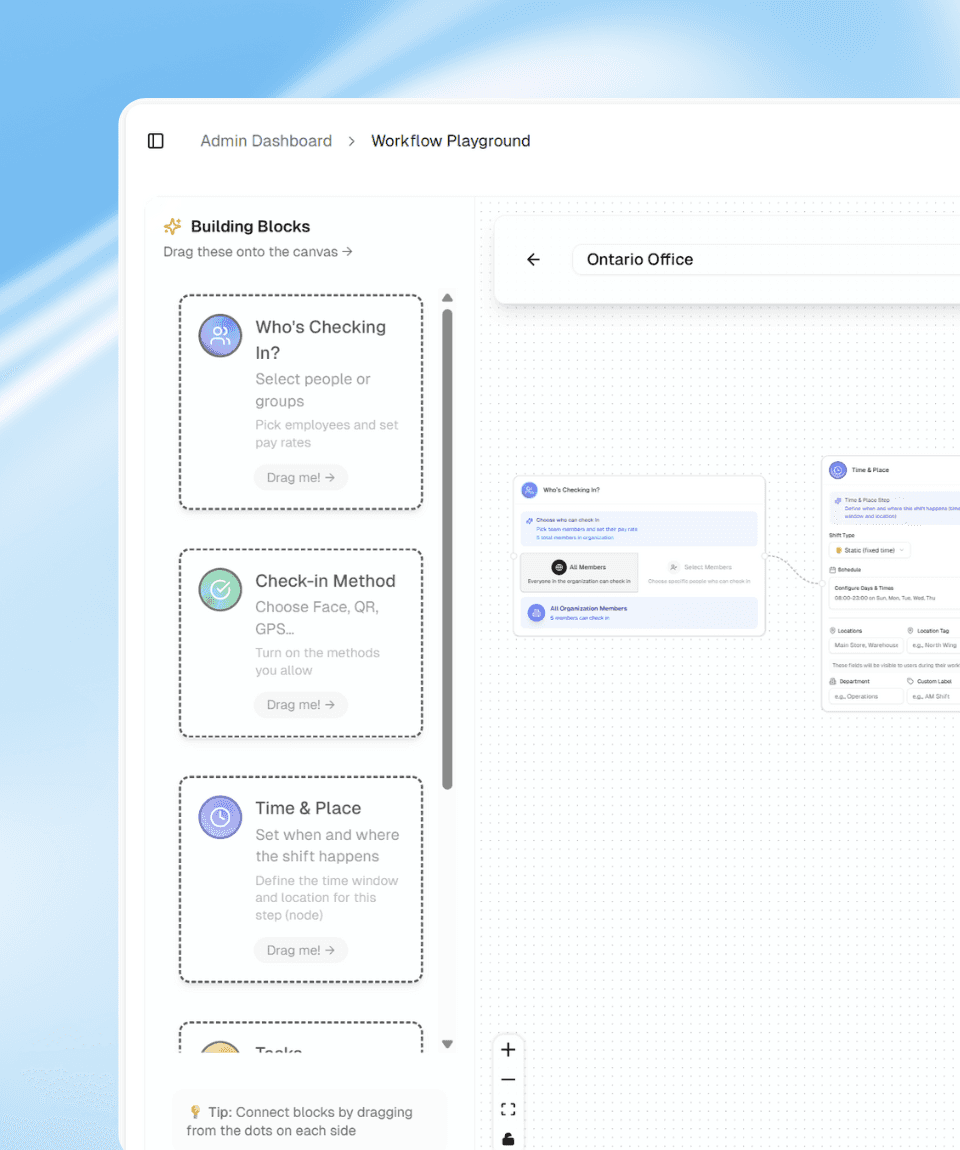
Sharkforce does the opposite. Instead of predefined workflows, we give you building blocks. Mix them however you need. Launch in minutes.
Why Businesses Need Flexible Workforce Workflow Software
We've noticed a pattern: companies waste time either fighting their software or building complicated workarounds. They need flexibility, but tools like Excel don't scale. They need structure, but rigid SaaS feels suffocating.
The Workflow Playground sits in the middle. It's designed around the idea that your business is unique and your systems should reflect that. Whether you're managing a 20-person team or a 5000-person operation, Sharkforce scales with you.
Core Building Blocks of Custom Workforce Workflows
Every workflow combines these components:
Who: Define which teams, roles or individuals the workflow applies to and their payroll. That's it. No permission matrices. Just clarity on scope.
When: Set days, times, locations. Recurring or one-off. Shift-based or fixed schedule. Flexible enough to handle reality.
How to verify: Choose your methods. Facial recognition prevents impersonation. Geofencing confirms location. QR codes provide quick access. Layer them or use one, your call.
What to track: Assign work items. When someone completes a task, they upload proof (a photo, a timestamp, a document). Sharkforce's AI reviews it against your criteria and either approves or flags it for review.
Rest periods: Automate lunch breaks and compliance. No manual tracking. No accidental violations.
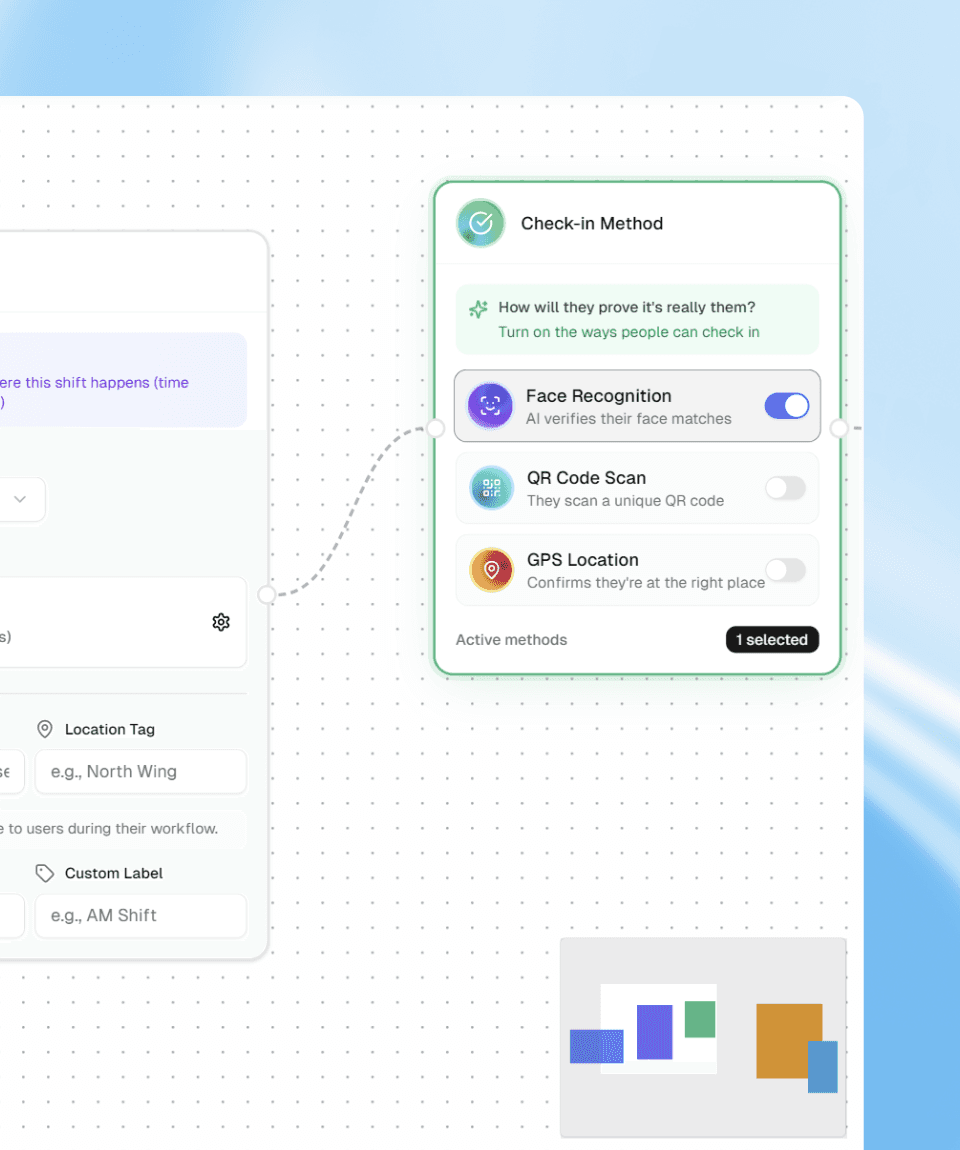
Custom Workforce Workflow Examples by Industry
Healthcare Workforce Workflow Automation (Medical Centers)
Specialists, nurses, and support staff move across critical areas that should never be open to everyone. You need quiet, safety, and clear accountability without slowing care.
Workflow: Limit access for specific roles to ICU, labs, or VIP suites. Facial recognition confirms identity at entry. Geofencing ensures staff are physically at the right place. Nurses upload a quick photo of equipment checks or medicine storage. AI verifies that everything matches your standards before marking the task complete.
Hospitality Workforce Workflow Automation
Your brand is built on consistency. Suites must be prepared perfectly. Amenities must be in place before the guest ever walks in.
Workflow: Housekeeping and butler teams check in with QR codes at service entrances. Each room has a short digital checklist. Staff upload a photo after setup. AI verifies key details like room layout, amenities, and turndown state. Management sees which rooms are guest ready in real time without manual inspection.
Retail Workforce Workflow Automation
You run high-value locations where presentation, security, and service need to be exact.
Workflow: Staff schedules are tied to specific zones such as jewelry, fitting rooms, or private lounges. Facial recognition validates clock in to prevent buddy punching. At closing, staff capture photos of display cases and storage areas. AI validates that cases are locked, items are in place, and nothing is left exposed. You end the day with visual proof and a clean audit trail.
Why Sharkforce Is Different from Traditional Workforce Software
Most workforce platforms force you to choose between two extremes: simplicity or flexibility. We built Sharkforce so you don't have to.
You're not locked into templates. You're not managing permission trees. You're not building spreadsheets as workarounds.
You just connect blocks and go live.
It's that simple.
Ready to explore how Sharkforce can transform your operations? Check out our features or browse our documentation to dive deeper into what's possible.