
AI task validation
Proof of the work, without chasing anyone. AI task validation.
Any task in a shift can ask for a photo. AI checks it against the step, and sends it back with what to fix when it falls short.
AI checks start on Pro: 50 a day, 300 on Business, 1,000 on Enterprise.
Shift steps
Morning shift
Opening the store
Adham Alaa
Lights and shutter
Switch on the lights and open the shutter.
Done
Front shelves
Take one photo of the front shelves, stocked and faced.
Drinks fridge
Take one photo of the drinks fridge, full and clean.
Try these: Step back so the whole fridge shows.
Count the till
Count the cash and note the total.
Front shelves
The step asks for
Approved·94%
What we saw: The front shelves are full, with every label facing out.
A photo lands on the step.
Adham adds a photo of the front shelves and taps Verify & Complete.
AI reads it against the step.
The step asks for stocked, faced shelves. The check looks for exactly that.
Approved, with its score.
94% and approved, so the step counts. You see it on the shift's record.
A weak photo goes back with what to fix.
The fridge photo scores 58%. Adham sees what to fix and takes a new one.
Repeat photos don't count.
Send a clear photo, a dark one, or one sent before. The app answers the way it does on a real shift.
The check reads each photo against the step's own words. There is no reference photo to set up.
- Adham adds a photo of the front shelves and taps Verify & Complete.
- The same photo sent again is caught. It doesn't count.
- A clear, new photo is approved, and the step is done.
- A dark one goes back, with what to fix.

Morning Shift
…In progress
Shift timer
0:42:18
Front shelves
AIRequiredTake one photo of the front shelves, stocked and faced.
Add photos
Adham adds a photo of the front shelves and taps Verify & Complete.
Try it
Photos checked before you look.
You write the step. The check does the looking. You see the score and the photos on the shift's record.
You say what to look for.
Write it once in the step. The check reads every photo against those words.
What should AI look for?
Shelves stockedLabels facing out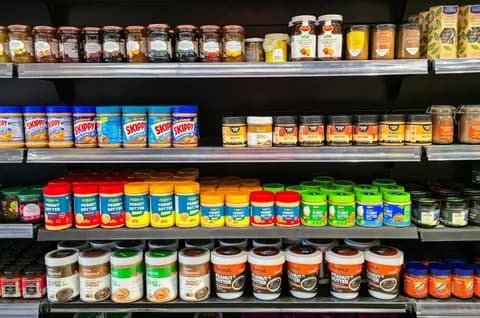
Reading
A clear answer, with a score.
Below the pass mark, the step can't be finished. The worker sees what to fix and tries again.
0Reviewing your submission…
Pass at 70%
Turn on the aisle lights so the lower shelves show.
Complete Step
Every angle, in one step.
A step can ask for every aisle at once, and they are checked together.
0 of 15 photosAdding photosAI checks every day.
From Pro up, for the whole workspace.
AI checks a day
Free0
ProBusinessEnterpriseNone on Free.
Questions owners ask.
Something else on your mind? Talk to us
How does the AI check a photo?
It reads the photo against the step's instructions. Then it answers Approved, Needs improvement or Not approved, with a score and what it saw.
What happens when a photo is sent back?
The worker sees what to fix, such as more light or a wider shot, and takes a new photo. The step counts once it passes.
Can a worker reuse an old photo?
Not the same photo file. Sending a photo again within 30 days is flagged as a duplicate, and the worker takes a new one.
Where do I see the photos?
On the shift's record in your dashboard: each step shows its photos, the AI score and the verdict.
How many photos can AI check?
Pro includes 50 AI checks a day, Business 300 and Enterprise 1,000. The free plan has no AI checks.
The rest of the job, in the same app.
See the work, not just the hours.
Book a 30 minute demo and set up your first photo step with us, or start free today.
AI checks start on Pro: 50 a day, 300 on Business, 1,000 on Enterprise.